How to download TikTok photo slideshows: every slide plus the sound
Short answer
Copy the TikTok photo post's link, paste it into the SnapVidBox TikTok photo downloader and tap Download. Each slide comes back as its own JPG row, "Photo 1 of N", "Photo 2 of N" and so on, exactly as TikTok serves it, with no watermark added, plus one MP3 row for the sound. Tap each row to save it; the slides are separate files, not a video or a ZIP.

To download a TikTok photo slideshow, copy the post's link in TikTok, paste it into the TikTok photo downloader on SnapVidBox and tap Download. Every slide is listed as its own JPG, "Photo 1 of N", "Photo 2 of N" and so on, and the sound is listed once as an MP3. Each row has a green Download now button that saves the file directly.
Photo posts, also called slideshows or carousels, are a different kind of TikTok post from a video. There is no video file behind them: TikTok stores a set of pictures and a sound, and the app plays them together. That is why a video downloader often fails on them, and why TikTok's own save option does not give you the pictures in their original form.
The images come back exactly as TikTok serves them. Nothing is resized or recompressed, and no watermark is drawn on them. This guide walks through each step on a phone and on a computer, explains what the list of files means, and covers what to do when a link does not work.
What you need
Nothing has to be installed, and you do not need a TikTok account to save a public post.
- A public TikTok photo post. Posts from private accounts, friends-only posts and deleted posts cannot be opened from a link by any outside tool.
- Its link, copied with TikTok's Copy link button or from the address bar on tiktok.com.
- A browser: Safari or Chrome on an iPhone, Chrome or another browser on Android, any desktop browser on Windows or macOS.
- A few minutes if the post has many slides: each picture is a separate file, saved one at a time.
Step 1: Copy the photo post's link
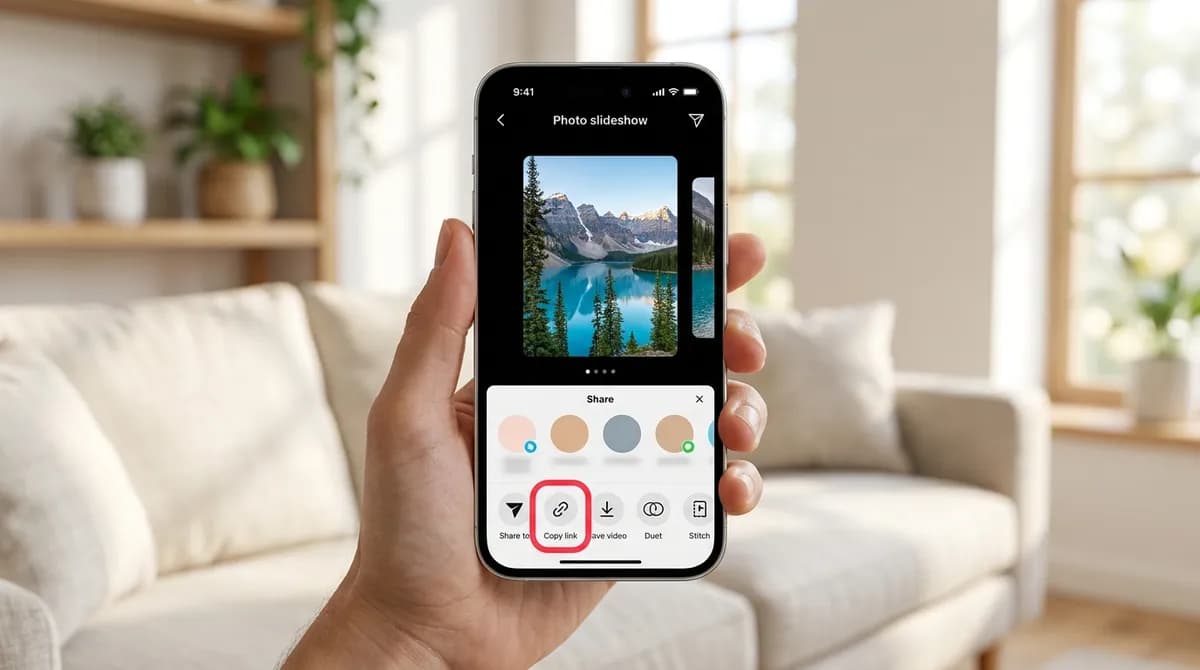
Open the slideshow in the TikTok app and tap the arrow-shaped Share button on the right-hand side of the screen. A panel slides up from the bottom; tap Copy link. TikTok shows a brief confirmation and the link is on your clipboard.
The link you get from Copy link works as it is, whether it is a short vt.tiktok.com or vm.tiktok.com address or a full tiktok.com/@name/photo/ address. On a computer, open the post on tiktok.com and copy the address bar instead. If the link was shared to you in a chat with some text around it, paste the whole thing; the site picks the link out.
Step 2: Paste it into the TikTok photo downloader
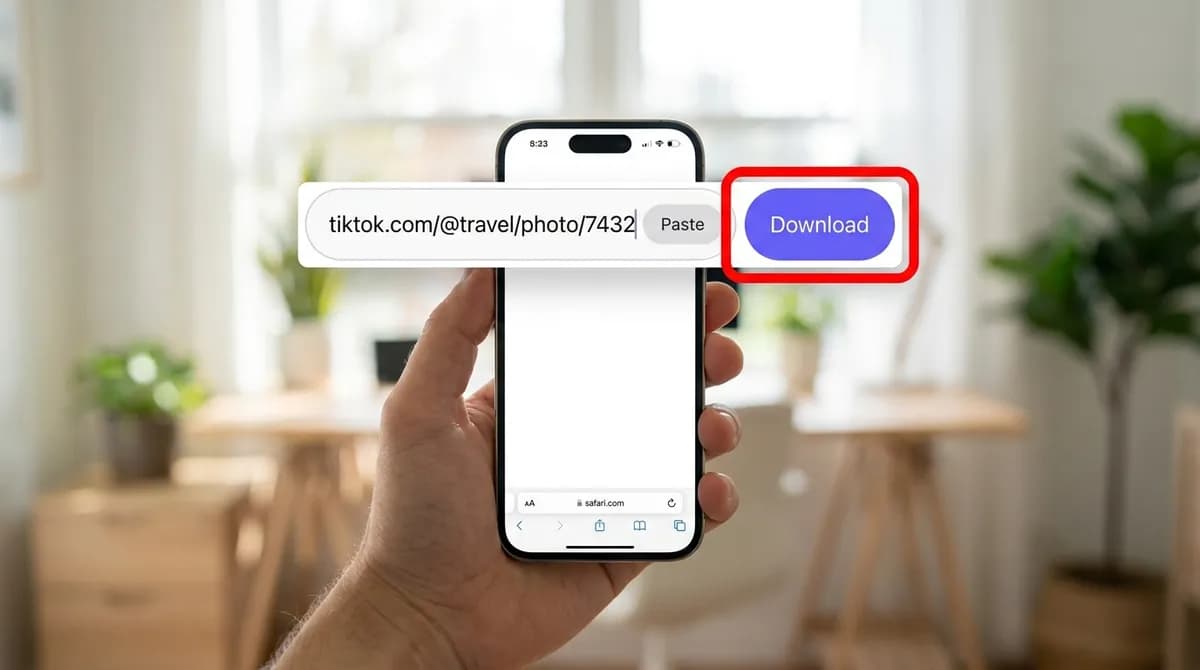
Open the TikTok photo downloader in your browser. Tap the Paste button inside the box, or touch and hold in the box and choose Paste; on a computer, press Ctrl+V or Cmd+V. Then tap the violet Download button.
The first time, the browser may ask to read the clipboard; allow it, or paste by hand. There is no sign-in, no app and no daily limit, and the site takes one link at a time.
Step 3: Check the list of slides
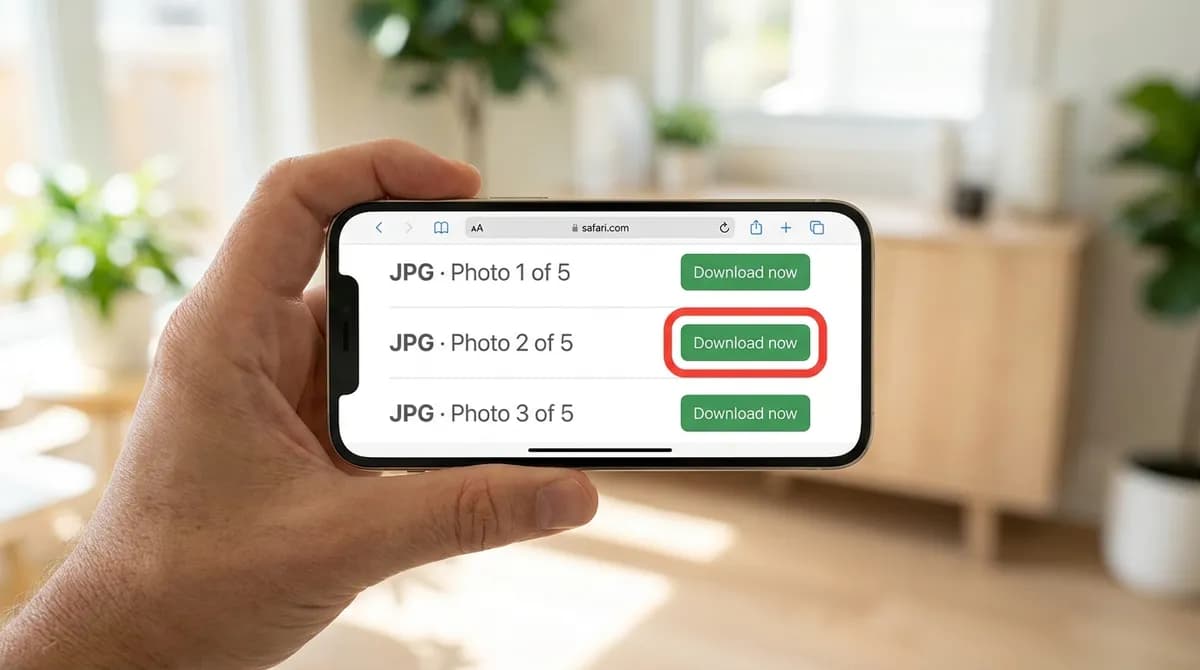
After a few seconds a result card appears. Above the list, a notice says "This is a photo post: N slides and the sound, rather than a video file.", with N being the number of pictures. Below it, each slide has its own row: "JPG · Photo 1 of N", "JPG · Photo 2 of N" and so on, in the order they appear in the app. The last row is "MP3 · Audio only", the sound of the post.
There is no video row for a photo post, because there is no video to download: the slides are not stitched together into an MP4. A separate cover row only appears when the cover is a different picture from the slides; usually it is the first slide, so it is not listed twice.

Step 4: Download each slide and the sound
Tap Download now on the first slide's row. All the rows are green Download now buttons, which means the file comes straight from TikTok's servers to your device with nothing processed in between, so each one starts at once. When it has finished, tap the next row, and so on down the list.
There is no ZIP file and no download-all button, so a ten-slide post means ten taps. If you only want some of the pictures, that is an advantage: skip the rows you do not need. The MP3 row is also direct: it is the post's sound as TikTok stores it, not converted on our server, so it downloads as quickly as the pictures.
Step 5: Find the pictures on your device
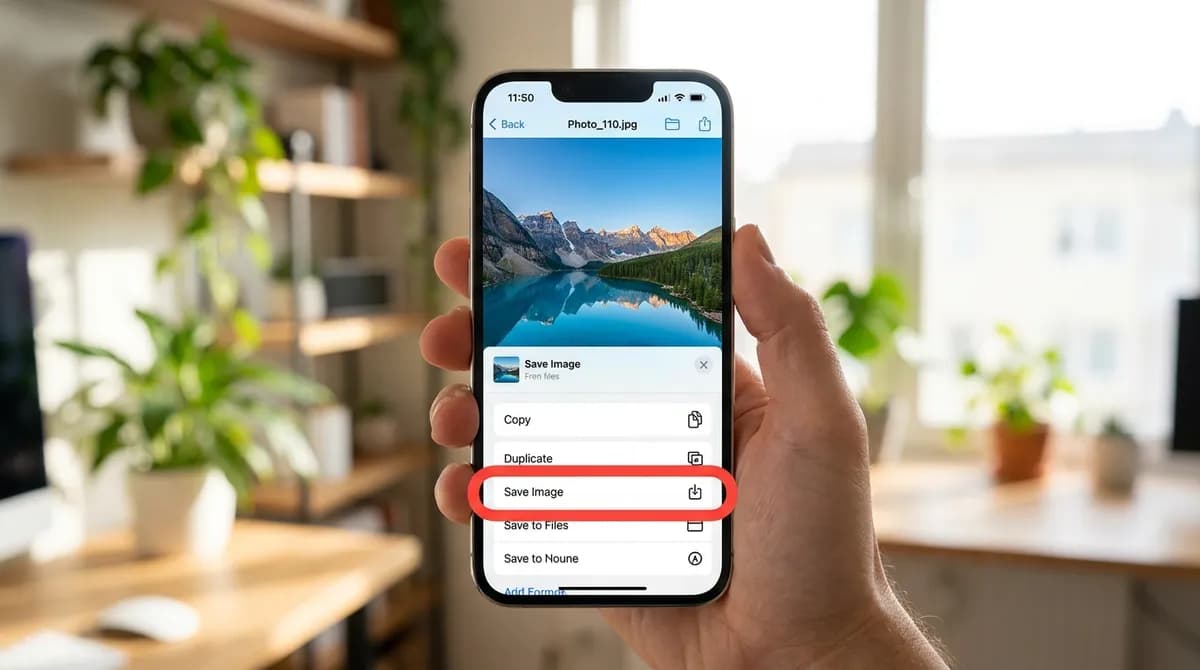
On an iPhone, Safari saves each JPG to the Files app, in Downloads (iCloud Drive by default, or On My iPhone if you changed the setting). To put a picture in Photos, open it in Files, tap Share and choose Save Image. The MP3 stays in Files, since Photos does not hold audio.
On Android, the files go to the Download folder, and the pictures show up in your gallery app on their own. On a Windows PC or a Mac, they go to the browser's Downloads folder; Ctrl+J in Chrome or Edge opens the list of recent downloads.
Which file to pick
For the pictures, there is only one version of each slide, and it is the best one TikTok has: the JPG rows are passed through as TikTok serves them, at their original size, with no TikTok logo or username drawn on top. A slide that the creator posted with text on it keeps that text, because it is part of the picture itself.
For the sound, the "MP3 · Audio only" row is the soundtrack that plays over the slideshow. It is useful if you want to set it as a ringtone, which the ringtone guide explains, or listen to it offline. If you only want the sound and not the pictures, the TikTok MP3 downloader does the same from any TikTok link.
Photo posts versus videos
The photo downloader is built for slideshows. If you paste the link of an ordinary video into it, you only get the video's cover image, the thumbnail, as a JPG. To save the video itself, use the TikTok video downloader; the no-watermark guide explains which MP4 to choose, and the iPhone guide covers moving it into Photos.
Going the other way, if you want the slideshow as a video, for example to post it somewhere else that only takes video, download the slides and the sound and put them back together in a video editor. Most phones and computers come with a basic one that can set each picture's duration and add an audio track.
If the post does not download
- "No downloadable media was found behind that link." or a message that the post is not public: the account is private, the post is friends-only, or it has been deleted. Only the people allowed to see it can, and no outside tool can open it.
- You got a single JPG and no slides: the link is for a video, not a photo post. Use the TikTok video downloader instead.
- Nothing happens after pasting: make sure you copied the post's link, not a profile or a sound page, and try again.
- A message instead of the list after a working link: TikTok sometimes limits how quickly requests can be made. Wait a few seconds and tap Download again.
- On iPhone you cannot find a picture in Photos: it is in Files, under Downloads, until you choose Save Image. The download troubleshooting guide covers more cases.
Using other people's photos responsibly
Saving a slideshow to look at later, for a recipe, a travel itinerary or an outfit you liked, is ordinary personal use. The pictures still belong to the person who made them. Reposting them as your own, using them in ads or selling them needs the creator's permission, and the sound often belongs to a music label as well. Credit the creator when you share, and ask when you are not sure. The copyright guide goes into more detail.
What you get from each kind of TikTok post
The same link box gives different files depending on what the post is:
| File | Photo post (slideshow) | Video post |
|---|---|---|
| Slides | One JPG per slide, "Photo 1 of N" and so on, original size, no watermark added | None |
| Sound | One "MP3 · Audio only" row, direct download | "MP3 · Audio only" row in the TikTok video downloader |
| Video | None: slides are not stitched into a video | MP4 rows in the TikTok video downloader |
| Cover | Only listed when it differs from the slides | The only file the photo downloader returns for a video |
| Download all / ZIP | Not available; save slides one by one | Not available |
In short
Copy the photo post's link, paste it into the TikTok photo downloader, and tap Download now on each "Photo N of N" row and on the MP3 row if you want the sound. The pictures arrive at their original size with no watermark added; on an iPhone, move them from Files to Photos with Save Image.
Frequently asked questions
Can I download all the photos from a TikTok slideshow at once?
Not in one tap. SnapVidBox lists every slide as its own JPG with a Download now button, and nothing is bundled into a ZIP file, so you save them one by one. Each one starts immediately.
Do the downloaded TikTok photos have a watermark?
No watermark is added. The JPGs are passed through as TikTok serves them, at their original size. Text that the creator put on a slide is part of the picture and stays.
Can I save a TikTok slideshow as a video?
Not directly: a photo post has no video file, and SnapVidBox does not stitch the slides together. Download the slides and the MP3, then combine them in any video editor.
Can I get the music from a TikTok photo post?
Yes. The last row of the list is "MP3 · Audio only", the sound that plays over the slides. It downloads directly, with no conversion.
Where do the photos go on my iPhone?
Safari saves them to the Files app, under Downloads. Open a picture, tap Share and choose Save Image to put it in Photos.
Why does a TikTok photo post not download?
Usually because it is not public: private accounts, friends-only posts and deleted posts cannot be opened from a link. If the post is public, wait a few seconds and try again.
Related guides

How to set a TikTok sound as your ringtone on iPhone and Android
Save a TikTok sound as an MP3, trim it to 30 seconds and set it as your ringtone: the GarageBand route on iPhone and the shorter one on Android.
8 min read
How to download TikTok videos on a PC or Mac
Save TikTok videos on Windows or macOS in the browser: copy the link, paste it, pick the MP4 without the watermark. No app or extension needed.
9 min read
How to save a TikTok video to your iPhone camera roll without the watermark
Safari saves downloads to Files, not Photos. The five steps from a TikTok link to your iPhone camera roll, with no watermark and no app to install.
8 min read
How to download a TikTok video without the watermark
Save TikTok videos without the logo on iPhone, Android or PC: copy the link, paste it into SnapVidBox and pick the HD MP4. No app or account needed.
9 min read
Sources
- Video downloads — TikTok
- Manage video downloads — TikTok
- Terms of Service — TikTok
Ready to try it?
Paste any supported link and the platform is detected automatically.
Open the downloader