How to download a Douyin video on Android without the watermark
Short answer
In Douyin, tap 分享 (Share), then 复制链接 (Copy link). Open SnapVidBox in Chrome, paste the whole copied text and tap Download, then tap Get on the "1080P" row marked "No watermark". Chrome saves it to the phone's Download folder, and it shows up in Google Photos or your phone's Gallery app under the Download album. You need no Douyin account, no Chinese phone number and no extra app.
To download a Douyin video on an Android phone without the watermark, copy the video's link in Douyin, paste it into SnapVidBox in Chrome and download the 1080P video marked "No watermark". Chrome saves it to the phone's Download folder, and the gallery picks it up from there on its own. Android has no separate step to move a video into the gallery, which makes it the shortest route of any phone.
What makes Douyin harder than TikTok is everything around the download. The app is in Chinese, it is not on Google Play outside China, and its Copy link button copies a line of Chinese text with the link buried inside. This guide names each button you need with its meaning, shows that a link someone sent you works without the app, and explains the one failure that is specific to Douyin: a first attempt that is turned away and works a minute later.
The steps below use Chrome, because it comes with almost every Android phone. Samsung Internet and other browsers work the same way; where they differ, the difference is noted further down.
What you need
- An Android phone with Chrome or another browser. Any version of Android from the last several years works.
- A Douyin link. Copy it in the Douyin app if you have it, or use a v.douyin.com link someone sent you on Zalo, Messenger or WhatsApp. The desktop address of a video, douyin.com/video/ followed by a long number, works too.
- A public video. Private posts, friends-only posts, deleted videos and videos limited to viewers in mainland China cannot be fetched.
- Free storage for the file. A one-minute Douyin video in 1080p is usually 10 to 30 MB; a long one can pass 100 MB.
- No Douyin account, no Chinese phone number and no VPN. SnapVidBox's own server asks Douyin for the files, so where you are does not matter for that step.
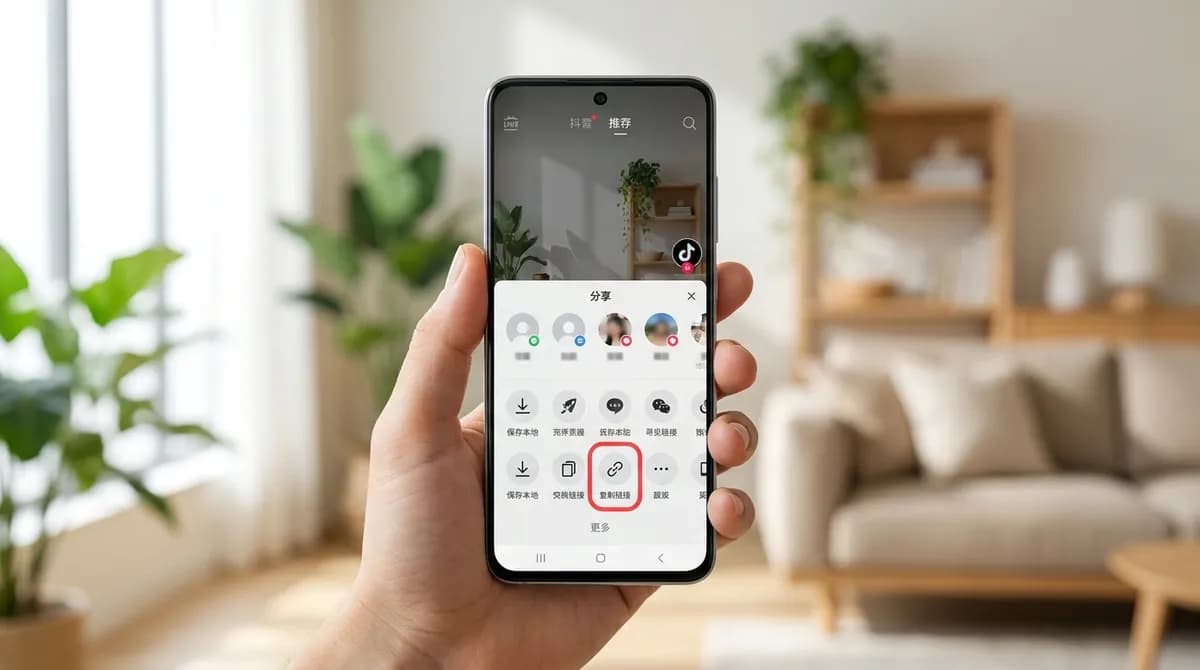
Step 1: Tap 分享 (Share), then 复制链接 (Copy link)
Open the video in the Douyin app and let it play full screen. On the right is a column of buttons: the creator's avatar, the heart, the comment bubble and, below them, an arrow-shaped button labelled 分享, which means Share. On popular videos it shows a share count instead of the word, but it is the same button.
Tap it. A panel slides up with a row of contacts and a row of actions. In the row of actions, find 复制链接, which means Copy link; you may need to swipe the row sideways to reach it. Tap it and Douyin copies the share text, with a short confirmation in the middle of the screen.
What you copied is a sentence of Chinese, a few emoji, a v.douyin.com link and sometimes a short code. Keep all of it; the downloader finds the link inside. Avoid 保存本地 (Save to device) in the same panel: it saves the copy with the Douyin logo and the creator's ID drawn over the picture, and it only appears when the creator allows it.
No app? Skip this step. A v.douyin.com link in a chat is already what you need: touch and hold it and choose Copy. Many people in Vietnam get Douyin links this way, from friends or from groups that share clips, without ever installing Douyin.
Step 2: Paste the text into SnapVidBox in Chrome
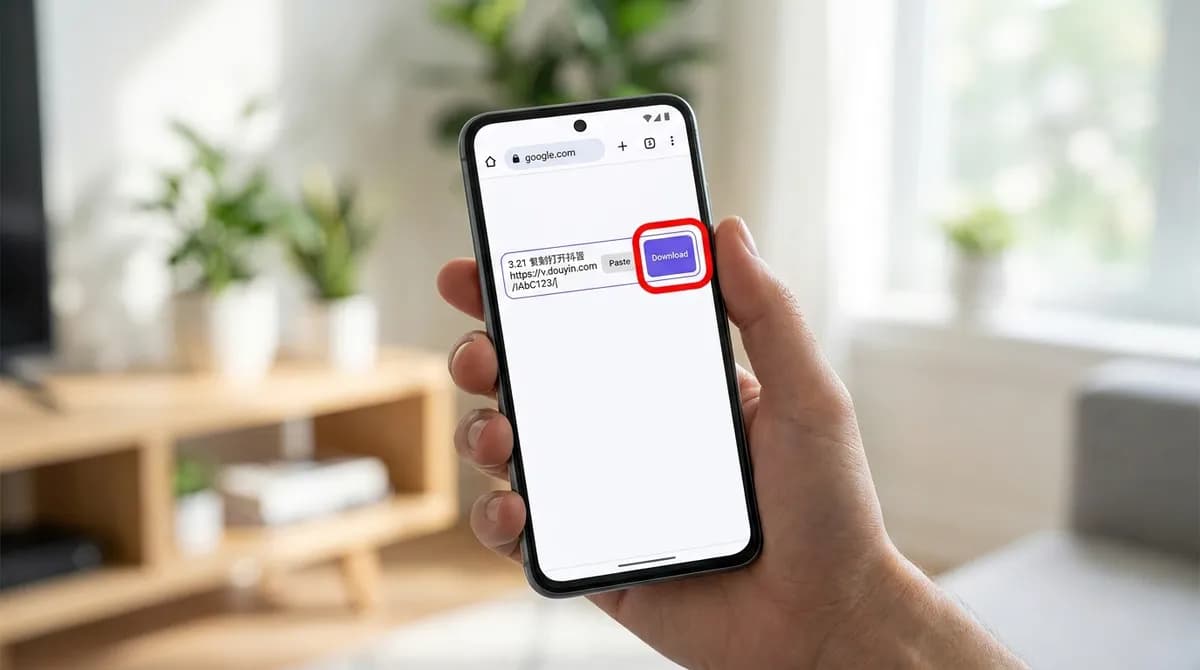
Open Chrome and go to the Douyin video downloader. Tap the Paste button inside the input box at the top of the page, or touch and hold inside the box and choose Paste. The whole share text appears, Chinese characters and all. Some Android keyboards also show the copied text as a suggestion above the keys; tapping it pastes it the same way.
Leave the text as it is and tap the violet Download button. The page picks the v.douyin.com link out of the surrounding words and detects that it is Douyin, so there is nothing to trim and no platform to choose. There are no pop-ups, redirects or countdowns while it works.
Douyin takes longer than other platforms to answer, often 10 to 20 seconds, because the server opens the video page the way a browser would. Keep the tab open while the spinner runs. If the first attempt comes back with an error even though the video is public, wait about a minute and tap Download again; Douyin sometimes turns the first request away and lets the next one through.
Step 3: Tap Get on the 1080P row
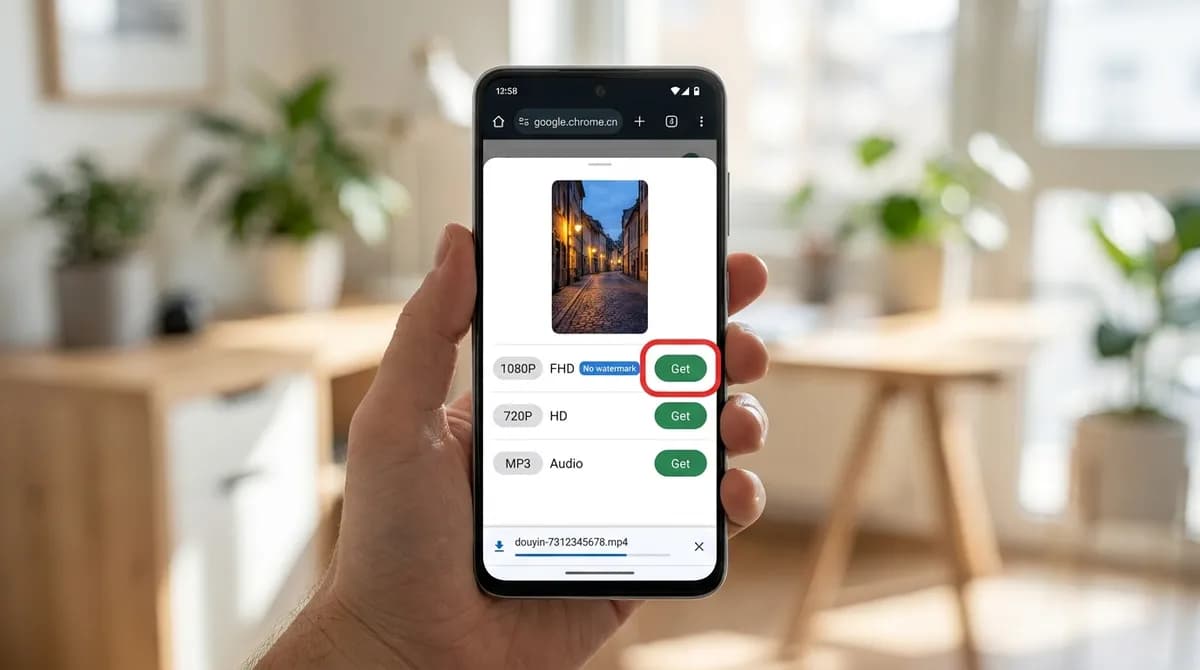
A result card appears with the video's cover, its title, usually in Chinese, and the list of files Douyin serves for that post. The first row is the video at the highest resolution Douyin stores: a chip reading 1080P, or 1440P or 2160P on some videos, with FHD, 2K or 4K beside it and a "No watermark" badge. Tap the green Get button at the end of that row.
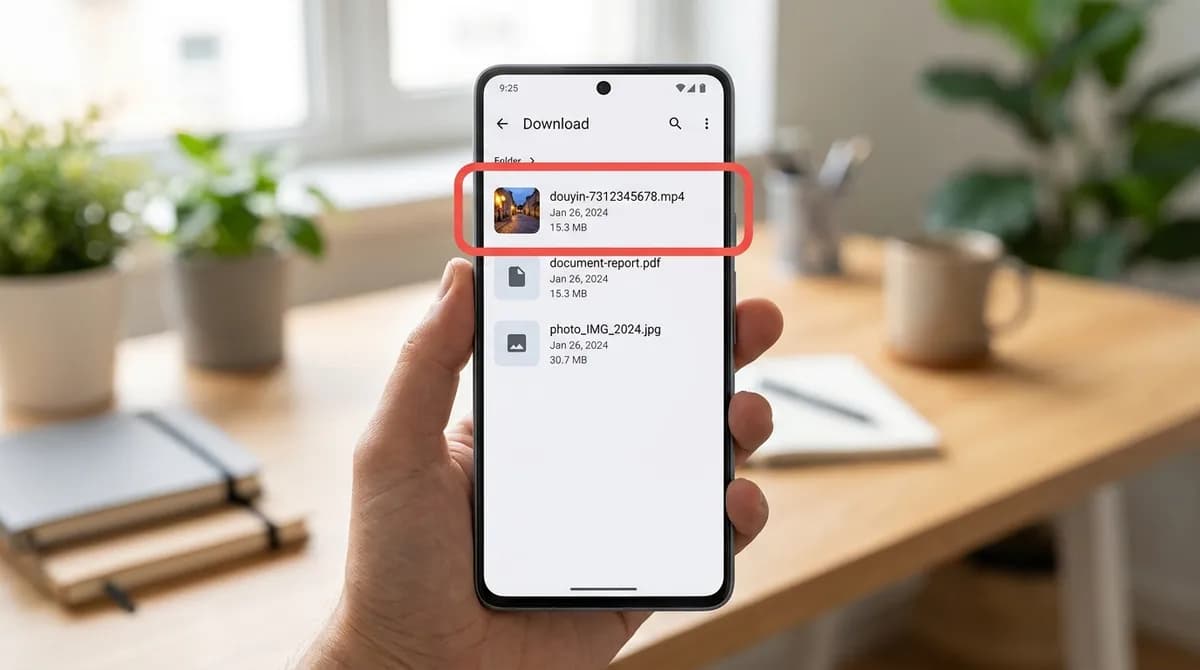
Chrome starts the download straight away and shows a bar at the bottom of the screen with the file name and progress. The name starts with douyin- and the video's long number rather than the Chinese title, because Chinese characters make awkward file names on some phones and computers. If you want to keep the title, copy it from the result card before you leave the page.
Some phones ask first whether to download the file, or warn that it "may be harmful". That is Chrome's generic prompt for any video file from a website, not a finding about this file; tap Download to continue.
Step 4: Open the video from the Download folder or the gallery
When the bar at the bottom says the download is complete, tap Open to play the video right away. Later, you can find it in three places. In Chrome, tap the three-dot menu and then Downloads. In the Files app (Files by Google, or My Files on Samsung), open Downloads. And in the gallery: Google Photos lists it under Library, Photos on device, Download, and Samsung Gallery shows a Download album.
The gallery may take a moment to notice a new file. If the video is not there yet, open it once from Chrome's Downloads list or from the Files app, then go back to the gallery. From there it behaves like any video you recorded: you can trim it, share it on Zalo or Messenger, or back it up.
Why not use Douyin's own save button?
When 保存本地 is offered, it is the quickest option if the logo does not bother you. The copy it saves has the Douyin logo and the creator's Douyin ID drawn into the picture, moving between corners as the video plays. That gets in the way if you want to edit the clip, use it in a slideshow or simply watch it without distraction.
It also only appears when the creator allows downloads, and only in the app. The steps above work from a link alone, for any public video, because they fetch the clean master Douyin keeps alongside the branded copy. Nothing is erased or blurred: it is a different file.
Using Samsung Internet or another browser
Samsung Internet works the same way: paste the text, tap Download, then Get on the 1080P row. It saves to the same Download folder, and its own list of downloads is under the menu (three lines), Downloads. Firefox and Edge for Android behave alike.
One thing to avoid is opening SnapVidBox inside another app's built-in browser, for example by tapping a link in Zalo or Messenger. Those in-app browsers often cannot save files at all, so the download silently does nothing. Use the menu in that view to open the page in Chrome first.
Saving the photos or the sound instead
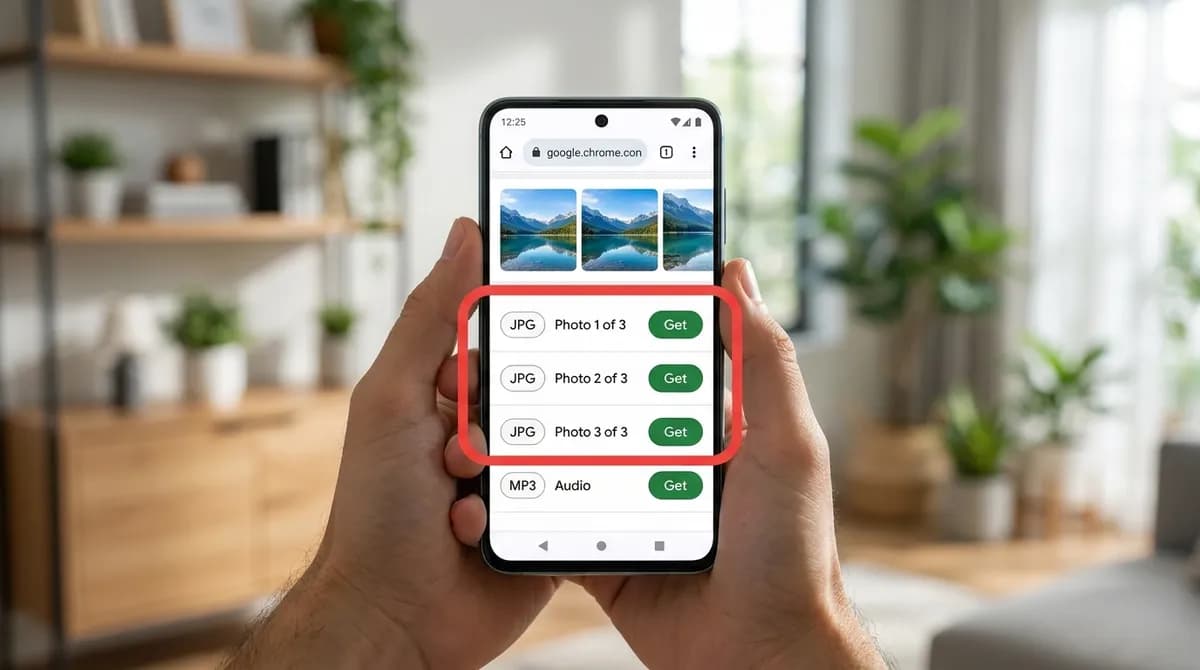
Douyin photo posts, the ones you swipe through, come back as one JPG per image, labelled Photo 1 of N and so on, with the background sound beside them. Tap Get next to each picture you want; they all land in the Download folder and the gallery. The Douyin photo downloader lists these posts on their own.
The MP3 row, labelled Audio, saves just the sound. It goes to the Download folder and plays in any music app; it does not show in the gallery, which holds pictures and video. The Douyin to MP3 page lists the MP3 first. Much of the music on Douyin is licensed separately from the video, so keep the file for personal listening.
If the download does not work
Most failures on Android come from one of these:
- The first attempt was turned away. Douyin sometimes refuses the first request from outside China. Wait about a minute and tap Download again.
- The link is from a private, deleted or region-limited video. Open it in the Douyin app or a browser; if you cannot watch it there without signing in, it cannot be downloaded either.
- The page was opened inside Zalo, Messenger or Facebook. Open it in Chrome instead, as described above.
- Nothing appears in the gallery. Check Chrome's Downloads list first; if the file is there, open it once and the gallery will catch up.
- The phone is out of space. Free some storage and download again; a partly downloaded file cannot be played.
- Downloads are blocked for the site. In Chrome, tap the lock or settings icon next to the address, open Permissions or Site settings, and allow automatic downloads.
Which file to choose on Android
The result list can offer several files for one post. This is what each one is for:
| File in the list | Use it for | Where it lands |
|---|---|---|
| 1080P (FHD) or higher, No watermark | Keeping, editing or sharing the video in full quality | Download folder, gallery › Download |
| 720P (HD) or 576P (SD) | Saving space, or sending over a slow connection | Download folder, gallery › Download |
| JPG, Photo 1 of N | Each picture of a photo post | Download folder, gallery › Download |
| MP3, Audio | The sound on its own, for listening | Download folder, music apps (not the gallery) |
| JPG, Cover image | The video's thumbnail picture | Download folder, gallery › Download |
Tidying up and using the video
Downloaded videos stay in the Download folder until you delete them, and Android does not clear it on its own. If you save Douyin videos often, open the Files app now and then, sort Downloads by size and remove what you no longer need. Deleting the file there also removes it from the gallery's Download album, since both show the same file.
A clean copy is for you. Watching it offline, or studying an edit or a dance, is ordinary personal use, but reposting it or using it commercially needs the creator's permission. The copyright guide explains where the line sits, the guide to Douyin links outside China covers link formats and failures in more depth, and iPhone users can follow the Douyin iPhone guide.
In short
Tap 分享, then 复制链接, paste the whole text into SnapVidBox in Chrome, tap Download, then Get on the 1080P row. The video lands in the Download folder and shows in the gallery without any extra step. If the first attempt fails, wait a minute and try again. No Douyin account, no Chinese phone number and nothing to install.
Frequently asked questions
Do I need the Douyin app on my Android phone?
No. The app is only one way to get the link. A v.douyin.com link someone sent you in a chat, or the douyin.com/video/ address from a computer, works the same way: paste it into the box in Chrome and continue from step 2.
Can I install Douyin from Google Play?
Not outside China: Douyin is published for the Chinese market, and the version on Google Play in other countries is TikTok, a separate app with separate videos. You do not need Douyin installed to download from it; a link is enough.
Where does the video go after downloading?
To the phone's Download folder. Chrome lists it under the three-dot menu, Downloads; the Files app shows it under Downloads; and Google Photos or Samsung Gallery shows it in a Download album, usually within a few seconds.
Is the quality lower than in the Douyin app?
No. The 1080P file is the highest rendition Douyin stores for that video, the clean master kept next to the branded copy, with the original sound. Some videos also offer a higher resolution, listed first when it exists.
Why does the first attempt sometimes fail?
Douyin is strict about requests from outside mainland China and sometimes turns the first one away. Waiting about a minute and tapping Download again usually works. If it keeps failing, the video is likely private, deleted or limited to viewers in China.
Can I download several Douyin videos at once?
One link at a time. Paste a link, download the file, then paste the next; each file appears in the Download folder as it finishes. Several downloads can run at the same time in Chrome while you move on to the next link.
Related guides
How to save a Douyin video to your iPhone camera roll without the watermark
Safari saves downloads to Files, not Photos. The five steps from a v.douyin.com link to your iPhone camera roll, without the watermark, with no app to install and no Chinese account.
8 min read
How to download Douyin videos outside China
Download Douyin videos from outside China without the watermark: tap 分享, then 复制链接, paste the whole share text and pick the clean MP4. No account needed.
8 min read
Which video downloader should you use? The five kinds, compared
Link tools, open-source web apps, the command line, desktop software and extensions solve the same problem differently. What each kind is good at, what it costs you, and which one fits your case.
9 min read
Why a video link won't download, and how to tell which problem you have
A link that refuses to download usually fails for one of five reasons. How to tell them apart from the message you get, and what actually fixes each one.
7 min read
Sources
- Douyin User Service Agreement (抖音用户服务协议) — Beijing Douyin Technology
- Download a file - Android phone & tablet — Google
- Find & delete files on Android — Google
Ready to try it?
Paste any supported link and the platform is detected automatically.
Open the downloader